

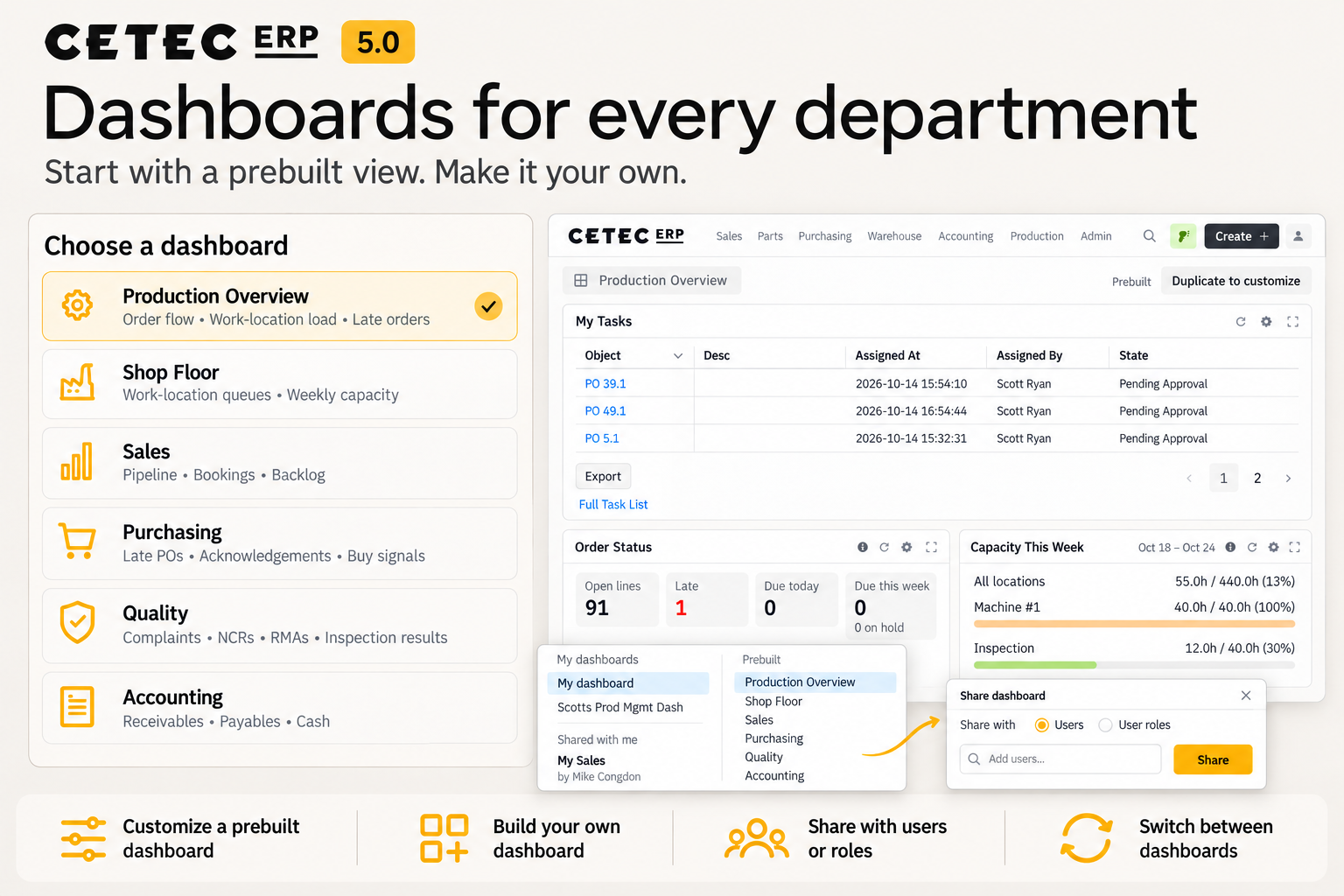
AUSTIN, TX (October 27, 2026) Cetec ERP, a full-suite ERP platform provider, today opened the beta of Cetec ERP 5.0, a major update to its web-native manufacturing ERP built around easier access to data and more intuitive daily workflows. Enhancements include lists opening with records already on screen, configurable dashboards for each department, and the ability for buyers to view full cost of a part in a single graph. Version 5.0 also introduces the layout patterns that will carry through the rest of Cetec ERP, where filters, columns, and actions work the same way from purchasing through production and accounting, making screens more familiar as users move between tasks.
User Driven Upgrades
Cetec ERP 5.0 is based on customers’ feedback through interviews and support tickets, usage data collected on how people navigate the system and use its screens, and what consultants see working alongside manufacturers during and after implementation. These findings shaped changes to screen layouts, navigation, and reporting, helping manufacturers reach the information they need more easily and move through daily tasks more intuitively. Users reach records and reports with fewer clicks, each person can set up their screens and dashboards around their own responsibilities, and department managers can check the state of their area from a prebuilt dashboard on day one.
“Cetec ERP 5.0 reflects what we learn through customer conversations, product usage, support questions, and years spent working directly with our customers,” said Shaun Fox, Director of Design at Cetec ERP. “We’ve always measured our ERP by the daily efficiency it adds for users, because that efficiency carries upstream into C-level management and reporting. This release is the next iteration of that with easier-to-use reporting and fewer clicks between a user and the task in front of them.”
What’s New in 5.0 (Highlights)
- List Screens Lists across Cetec ERP open with records on screen, ready to filter, sort, and export. Users choose the columns that matter to them and Cetec ERP remembers the layout, so a buyer’s purchasing list or a controller’s A/R list shows the information each of them works from.
- Role-based Dashboards Users build dashboards around their own responsibilities by arranging and resizing widgets on a grid and can share them with a team or role. Prebuilt dashboards for production, shop floor, sales, purchasing, quality, and accounting give every department a working starting point, with widgets such as Order Status, Capacity This Week, and Customer Complaints.
- PO Price History Buyers can see what they’ve paid for a part over time in a single graph, compare vendors, and filter by order quantity. Foreign currency and units of measure are normalized so the comparison is apples to apples, and each point links back to the PO lines behind it, including actual lead time.
- Customer-Facing Documents Quotes, invoices, project summaries, travelers, and packing labels share a cleaner, consistent design. Empty fields drop off and wide documents print in landscape, so what goes out to customers and the shop floor is shorter and easier to read.
- Work Order Screen The redesigned layout keeps timers, work instructions, and moving work between locations at the center of the screen, with materials, documents, history, and schedule a click away in the left-hand menu. Users can reach the information and actions needed for the next step more easily.
Availability
Cetec ERP 5.0 is live in beta for customers now, with general release beginning in early November. Full 5.0 release notes are online at https://cetecerp.com/blog/cetec-erp-version-50/, along with training guides for list screens and the Work Order screen, and command palette documentation.
About Cetec ERP
Cetec ERP is a full-suite, web-native ERP for manufacturers, covering sales, purchasing, inventory and traceability, production, quality, and accounting in one system. It is configured out of the box for a wide range of manufacturing environments, including electronics, cable and wire harness, aerospace and defense, medical device, and industrial equipment. Cetec ERP’s developers and consultants work directly with customers through implementation and support.
For additional information about Cetec ERP, visit cetecerp.com.
